最初にPS5/Steamを選択してください。ゲーム内のルーム作成・検索・参加は、Full Strideで自分で操作します。
ルームを立てる人(主催者)
待機中の人がいれば、ルームを立てたときに参加してもらえるチャンスです。
Full Strideを起動し、マルチプレイで自分のルームを立てます。
開催中として60分間表示。開始通知で、新たな参加希望者を呼び込めます。ID・募集レースの入力は任意です。
続けるときは「60分延長」。やめるときは「開催終了」を押し、待機中の人にも終了を知らせます。
「開催中」の登録と開始通知をきっかけに、新しい参加者が見つかる可能性があります。
ルームに参加したい人(参加者)
「ルームが立てば参加できます」という意思表示が、主催者の開催を後押しします。
主催者がいればIDや募集レースを確認。いなければ通知をオンにして開催を待つこともできます。
Full Strideのルーム検索画面でホストの短縮IDを確認し、参加する部屋を選びます。アプリから自動入室はしません。
自分が待機中なら、主催者の終了を通知で受け取れます。次のルームも探すなら待機中を維持し、遊び終えたら解除します。
開催者がいなくても先に意思表示することで、誰かがルームを立てるきっかけになります。
補足・詳しい操作
まずは上の流れだけで十分です。通知設定や細かな仕様は、必要なときに開いて確認してください。
🔔 通知の使い方
「お知らせ」で通知をオンにして、端末の通知許可を有効にします。「開催開始」「待機開始」「開催終了」から受け取りたい通知を選べます。
- 主催者:開催中の登録で、希望者へ開催開始を通知します。
- 参加者:待機中の登録で、ルームを立てようとしている人に参加希望を知らせられます。
- 開催終了:同じ機種で待機中かつ終了通知をオンにしている人が対象です。全員に届くわけではありません。
- 通知に登録済みIDを表示できますが、配送・既読は保証されません。
iPhone:Safariでサイトを開き「共有」→「ホーム画面に追加」。追加したアイコンから起動して通知を許可してください。
PC:Edge/Chrome等でサイト通知とOS通知を許可してください。
⏱️ 登録時間・延長・終了のルール
- 「開催中」は60分、「待機中」は30分で自動的に表示期限になります。継続するなら延長してください。
- 同じ機種で「開催中」と「待機中」は同時登録できません。
- 主催者が「開催終了」を押すと、15分間「最近終了したホスト」に表示され、対象の待機者には終了通知の送信を試みます。
- 時間切れによる自動終了は、終了通知の対象外です。
- 参加後も別のルームを探すなら「待機中」を維持できます。30分経つ前に必要に応じて延長し、もう遊ばないときは「待機終了」を押してください。
🎮 ゲーム内でのルームの探し方(画面付き)
ゲーム内のマルチプレイ検索画面には、部屋を立てた人のIDの先頭数文字と、レースの施行条件が表示されます。アプリで見たIDを手掛かりに該当する部屋を選び、その後はゲーム内の案内に沿って参加します。
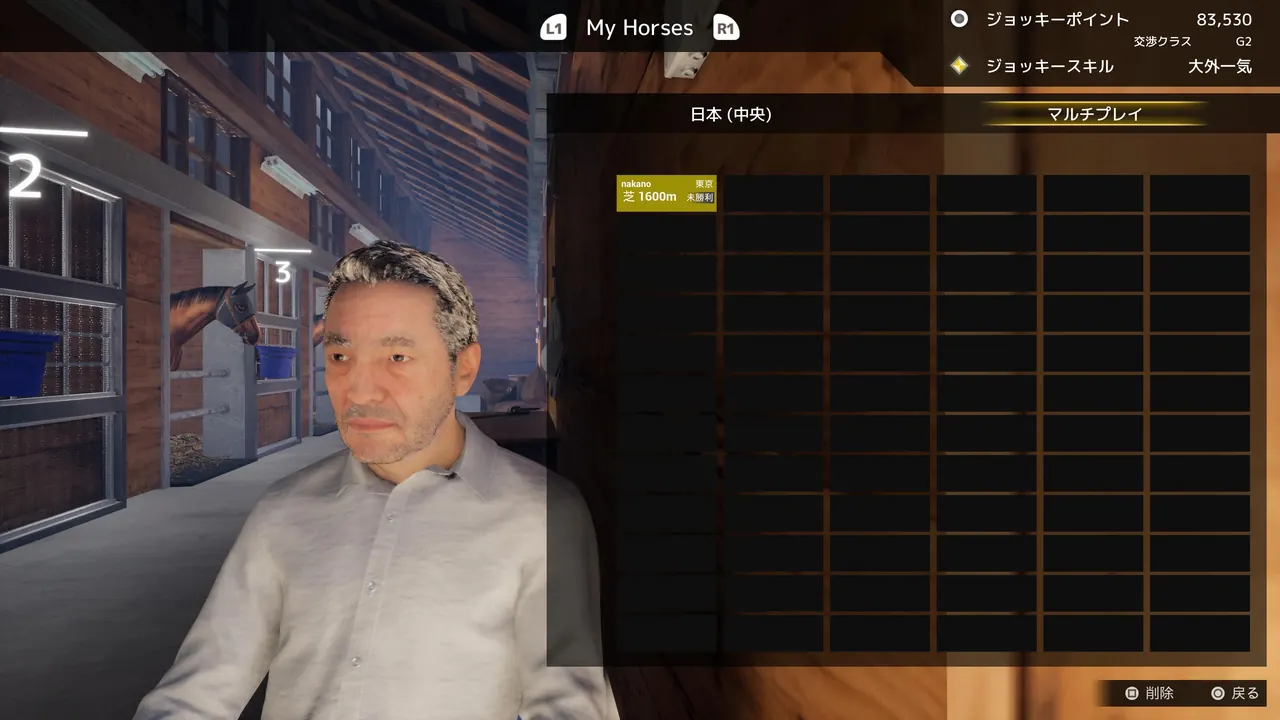
❓ よくある質問とプライバシー
待機中が0人なら開催しないほうがいい?
いいえ。開催中を知らせることで、まだアプリに登録していない人が通知を見て参加する可能性があります。
部屋に自動で入れますか?
いいえ。アプリはゲームと連携していません。ルームの作成や参加はゲーム内で行います。
IDは必須ですか?
任意です。ただしゲーム内でホストを探しやすくなるため、公開しても問題ないIDであれば登録をおすすめします。IDと希望レースはアプリの利用者に公開されます。
待機したまま、いつまでも通知が届きますか?
待機登録は30分で期限切れになります。継続するなら延長してください。通知設定・機種選択もご確認ください。
Want to host a room?
If someone is waiting, they may join when you open a room.
Launch the game and manually open your multiplayer room.
Your status appears for 60 minutes. Hosting alerts may attract more players. ID and race preference are optional.
Extend by 60 minutes if you continue. Tap “Stop hosting” when done so waiting players can see you've finished.
Posting a hosting alert could help other players discover your room.
Want to join a room?
This tells hosts someone is ready to play and may encourage them to open a room.
Check listed host IDs and race preferences. If nobody is hosting yet, enable alerts and wait.
In Full Stride, match the shortened host ID to the app listing and select the room. The app won't join automatically.
While you're marked as waiting, you'll be eligible for an alert when a host stops. Stay marked as waiting if you're looking for another room; turn it off when you're done playing.
Even when no room is open, your waiting status can encourage somebody to host.
More details
The flowcharts above cover the basics. Open a section below only when you need it.
🔔 Notifications
Enable push notifications in the app and allow notifications on your device. You can choose hosting-started, waiting-started, and hosting-ended alerts.
- Starting to host can notify players who opted in.
- Marking yourself as waiting lets prospective hosts know someone wants to play.
- Hosting-ended alerts are attempted only for users currently waiting on the same platform who opted into end alerts.
- If an ID is provided, it may appear in the alert. Delivery and read status aren't guaranteed.
iPhone: Use Safari → Share → Add to Home Screen, then open the installed app and enable notifications.
PC: Allow notifications for this site in Edge or Chrome and in your OS settings.
⏱️ Duration, extension, and ending
- Hosting lasts 60 minutes and waiting lasts 30 minutes; extend if you're still available.
- You cannot be marked as both hosting and waiting on the same platform.
- When you tap Stop hosting, your ID is shown in Recently ended hosts for 15 minutes, and relevant waiting players may receive an end alert.
- Automatic expiry does not send a hosting-ended alert.
- You can remain marked as waiting while looking for another room. Extend the 30-minute waiting period as needed, and turn it off once you finish playing.
🎮 Finding a room in Full Stride (screenshot)
Full Stride's room search shows the first few characters of the host's ID and race conditions. Match the shortened ID to the host listed in this app, select the room, and follow the in-game screens.
❓ Frequently asked questions & privacy
Should I avoid hosting if nobody is waiting?
No. Your hosting alert may help players discover a room.
Does the app automatically create or join a room?
No, room creation and joining happen inside Full Stride.
Must I enter my PSN/Steam ID?
No, it is optional. If entered, your ID and race preference are visible to other app users.
How long does waiting stay active?
30 minutes. Extend your waiting status if needed, and check your platform and notification preferences.